
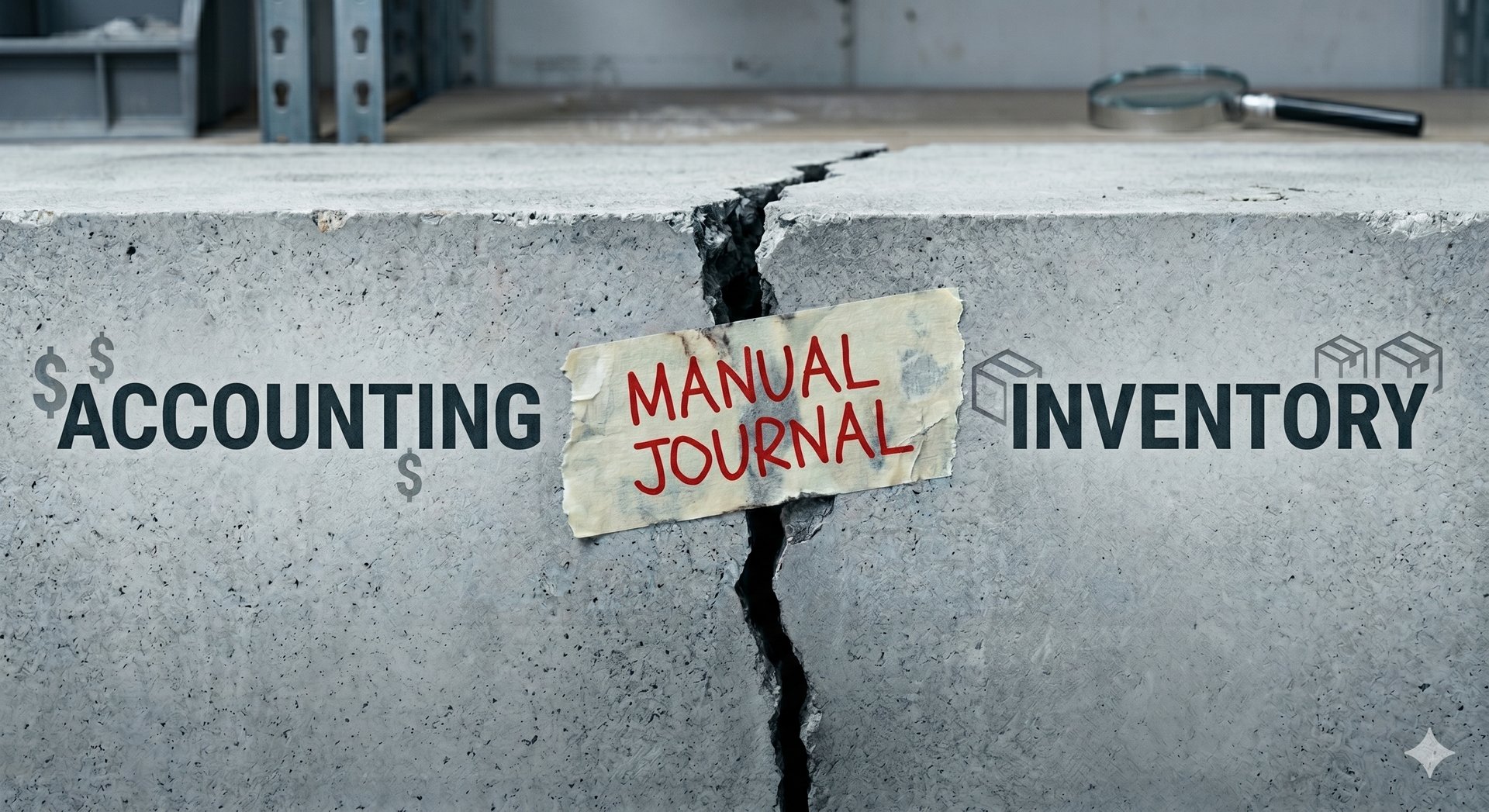
Why Cin7 Inventory Still Does Not Match After a Manual Journal
Learn why Cin7 inventory may still not match after a manual journal, and when to trace the issue back to source.
SYSTEMS AND SOFTWAREECOMMERCE
Why Cin7 Inventory Still Does Not Match After a Manual Journal
Jaco Roets, Co-founder & CEO @ Fiskal


Manual journals can be valid in the right Cin7 Core workflow.
They may be used for specific financial adjustments, landed cost allocation, overhead capitalisation, or approved accounting treatments when the source context and account mapping are correct.
But if your team posted a manual journal to fix an inventory or balance sheet difference, and Cin7 still does not match, the journal may have corrected the wrong layer of the problem.
The key issue is usually not the journal itself.
The issue is the gap between the General Ledger in QuickBooks Online or Xero and the Inventory Sub-ledger in Cin7 Core.
A manual journal may adjust the balance sheet, but it may not update the Cin7 Inventory Cards, stock-on-hand quantity, unit costs, received dates, or original workflow trigger that caused the mismatch.
That is why the balance sheet can look corrected while Cin7 inventory still does not reconcile.
The Point of Divergence: Inventory Sub-ledger vs General Ledger
Cin7 Core manages inventory through operational records.
Those records include:
Inventory Cards
stock movements
stock-on-hand quantities
unit costs
received dates
purchase and sales workflow activity
Ship Tab authorization
stock adjustments
stock revaluations
Your accounting system manages financial reporting through the General Ledger.
When transactions sync correctly, Cin7 and the accounting system should remain aligned, allowing for valid timing differences.
The problem starts when a manual journal is posted directly in QuickBooks Online or Xero to force the balance sheet to match.
That journal may adjust the GL balance.
But it does not update the Cin7 Inventory Cards.
It does not update physical stock movement.
It does not update stock-on-hand quantity.
It does not update unit costs.
It does not correct received-date logic.
So the accounting report may look closer, but the Cin7 inventory sub-ledger may still carry the original issue.
This is why the same reconciliation difference often comes back at the next month-end.
The journal fixed the symptom. It did not necessarily fix the source.
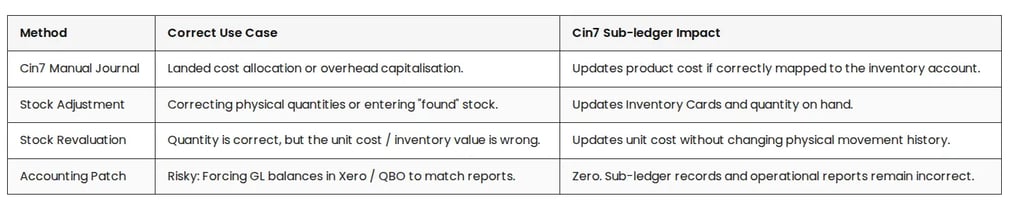
When to Journal vs When to Adjust
The correct fix depends on where the error lives.
A financial-layer issue may require one type of correction. A physical inventory issue, unit cost issue, or workflow issue may require a different one.
The important point is this:
A balance sheet difference does not automatically mean the correction belongs in the GL.
A stock report difference does not automatically mean the fix is a stock adjustment.
A cost issue does not automatically mean revaluation is the answer.
The correction must match the source problem.
The 5 Most Common Reasons the Difference Comes Back
If a manual journal was posted but Cin7 still does not match, check these common technical triggers.
1. Ship Tab Authorization
In Cin7 Core, COGS timing is tied to Ship Tab authorization, not simply the sale invoice date.
If COGS is manually adjusted based on an invoice date before the related fulfilment workflow is complete, the business may create another timing or reconciliation issue when the workflow posts normally.
The issue is not that every manual COGS adjustment is wrong.
The issue is that COGS timing must follow the correct Cin7 workflow trigger.
2. GRNI / GINR Timing
Some differences are legitimate timing states.
GRNI refers to Goods Received Not Invoiced.
GINR refers to Goods Invoiced Not Received.
These balances may sit in asset or liability accounts depending on the Cin7 mapping.
If the difference is sitting in a GRNI or GINR account, posting a journal to a generic Inventory Asset account may not clear the actual accrual difference.
That can make the balance sheet look adjusted while the real timing issue remains unresolved.
3. Account Mapping Mismatch
If a manual journal is used to capitalize costs into stock value, the account used matters.
The debit account must align with the inventory account mapped to the relevant product lines.
If the journal hits a different account, the GL may show an adjustment, but Cin7 inventory value may still not reconcile.
This is a common reason the accounting team believes the correction has been made, while the inventory reports still show a difference.
4. Native QuickBooks Inventory Tracking
For QuickBooks Online users, native inventory tracking should be turned off when Cin7 Core is the inventory source.
If QBO is also tracking inventory, it may calculate its own COGS using its own average cost logic.
That can create duplicate or conflicting COGS entries outside the Cin7 workflow.
In that case, a manual journal may not solve the underlying problem because the accounting system is also trying to act as an inventory system.
5. Received Date / FIFO / FEFO Limitations
Manual journals cannot correct FIFO / FEFO “In” dates.
Cin7 Core measures inventory age from the physical Stock Received Date or Assembly Date.
If the issue relates to inventory age, received-date logic, costing sequence, or FEFO / FIFO behavior, a manual journal will not fix the source record.
The correction needs to happen through the relevant stock receipt, assembly, stock adjustment, or source workflow process.
The Diagnostic Path Before Posting Another Journal
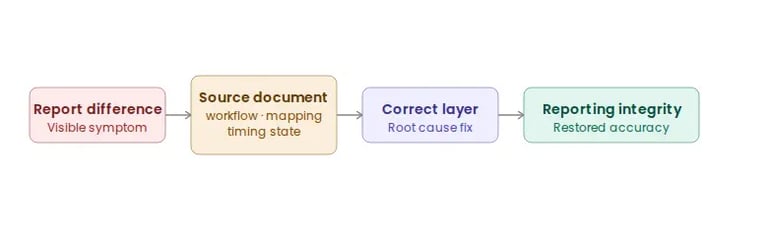
Before posting another manual journal, the goal should be to find where the mismatch entered the system.
Do not start by forcing the GL to match.
Start by tracing the source.
1. Check Sync History
A manual journal may look necessary when the real issue is a failed or pending sync.
Check whether the original system-generated transaction is sitting in a failed or pending state because of:
account mapping error
period lock
missing account
sync issue
timing problem
If a valid transaction already exists but has not synced correctly, the fix may be resolving the sync issue, not posting a new journal.
2. Use the Transactions vs. Stock on Hand Difference Report
The Transactions vs. Stock on Hand Difference Report can be a useful diagnostic starting point.
It helps locate discrepancies between financial document values and physical inventory card values.
But it does not prove the full root cause by itself.
The report helps show where the mismatch appears.
You still need to trace why it happened.
3. Trace to Workflow
Once the mismatch is visible, trace it back to the source workflow.
The issue may come from:
a partially received purchase order
a supplier invoice timing issue
an unfulfilled sale
Ship Tab authorisation
an unauthorised credit note
incorrect landed cost treatment
stock adjustment history
stock revaluation history
a failed sync
an incorrect mapping
a locked accounting period
This is where the real diagnosis happens.
The question is not only “what number is wrong?”
The question is “which source event created the wrong number?”
4. Execute at Source
Only use a journal when the issue is genuinely financial and the journal is supported by the correct source context.
If the issue involves physical quantity, stock movement, or Inventory Cards, a stock adjustment may be more relevant.
If quantity is correct but unit cost is wrong, stock revaluation may be more relevant.
If the issue sits in landed cost treatment, GRNI / GINR, Ship Tab timing, or account mapping, the correction needs to happen in that layer.
If the original document or workflow is wrong, source correction may involve undoing, voiding, correcting, or re-authorising the relevant task with the right data.
That could involve a Purchase Invoice, Stock Received record, Ship Tab, or another source workflow.
The diagnostic path is:
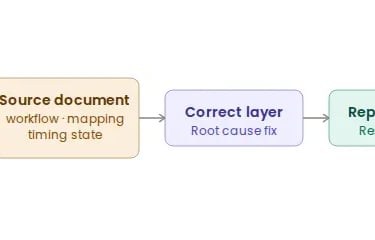
Still Seeing Differences After a Manual Journal?
Repeated journal patching can create reconciliation drift.
Finance may trust the balance sheet while operations continue working from unresolved Cin7 inventory records.
That creates problems for:
inventory valuation
COGS accuracy
margin reporting
month-end reconciliation
purchasing and replenishment decisions
finance and operations alignment
In Fiskal’s review process, recurring or material residual differences are treated as a signal to investigate workflow, mapping, source-document, or sync issues before another journal is posted.
If your balance sheet has been adjusted but Cin7 inventory still does not match, the issue may sit upstream in stock movement, Inventory Cards, unit costs, account mapping, GRNI / GINR timing, Ship Tab authorisation, landed cost treatment, Sync History, or period-lock behaviour.
Fiskal helps trace the mismatch back to the source so your inventory, accounting, and reporting can be brought back into alignment.
Need Support With Your Cin7 Inventory and Financial Alignment?
Learn how Fiskal helps product-based businesses diagnose and fix the system misalignments behind manual journal distortion, inventory valuation drift, and reconciliation gaps in Cin7.
📞 Or call us directly: (954) 415-7895
Share on your socials.


Finance Ops:
Bookkeeping
Controlling
FP&A
Industries
Why Fiskal:
About us
Customer Stories
Careers
Contact Us
Contact Details:
+1 (954) 415-7895 or +1 (267) 717-7923
info@fiskalfinance.com
Offices:
Florida
New York
Pennsylvania
Stellenbosch
Resources
Blog
The Fiskal Score
Cin7 Academy
FAQs
Privacy Policy




Cin7 Solutions:
Problems We Solve
Integrations
Report Accuracy
Forecasting & MRP
Cin7 Implementation
Cin7 Support