

Cin7 Core & Xero: How Data Really Flows Between Systems
Learn how Cin7 Core triggers, inventory movements, and accounting data flows work in real life.
SYSTEMS AND SOFTWAREECOMMERCE
Cin7 Core Data Flows: How Operations, Inventory & Finance Really Work Together
Christo Kleinhans, COO @ Fiskal


A conversation with Fiskal COO, Christo and why this matters for $1M to $30M product businesses
Cin7 Core is an operational inventory system that connects sales, purchasing, warehouse activity, and accounting. It does not behave like traditional accounting software. Instead, it uses operational triggers such as fulfilment, receiving, and adjustments to drive financial entries.
This distinction is critical.
Most data issues in product businesses do not come from bad reports. They come from misunderstanding how Cin7 Core generates those reports in the first place. When teams apply traditional accounting expectations to a real-time operational system, the result is mismatched financials, unreliable inventory, and reconciliation problems.
This article explains how Cin7 Core actually moves data between operations and accounting, and what must be understood to keep both aligned.
Why This Perspective Matters
Many businesses reach a point where:
Financial reports cannot be trusted
Inventory levels do not match reality
Reconciliation becomes time-consuming and unclear
This is rarely a software problem.
It is a systems understanding problem.
Most operators know what outputs they want, but not the triggers required to produce them. This gap creates cascading issues across finance, operations, and reporting.
Finance and Operations Are One System
For product businesses, inventory sits at the centre of both operations and financial reporting.
Cin7 Core acts as the operational layer:
It tracks stock movement
It controls fulfilment and receiving
It determines when inventory value changes
Accounting platforms like Xero or QuickBooks act as the financial layer:
They record the outcomes of those movements
If the operational layer is misaligned, the financial layer cannot be trusted.
The Core Principle: Cin7 Runs on Triggers, Not Reports
Most reconciliation issues start because teams go straight to reports.
But reports are outputs.
Cin7 Core is driven by triggers.
Understanding these triggers is the foundation of everything that follows.
Sales Workflow: What Actually Drives Revenue and COGS
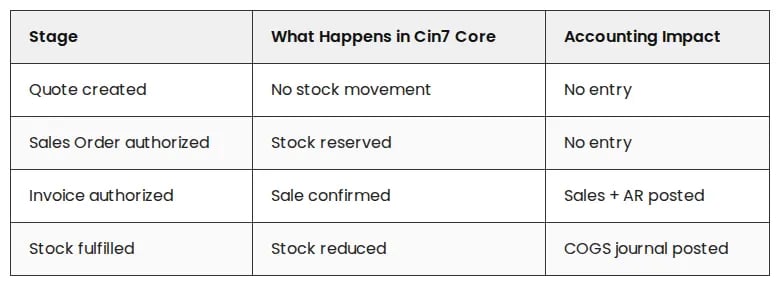
Key Concept: Sales and COGS Are Decoupled
Revenue is recorded when the invoice is authorized
COGS is recorded when stock is physically fulfilled
This creates real-world effects:
COGS may fall into a different period than revenue
Partial shipments create partial COGS entries
A single invoice can generate multiple COGS journals
This is expected system behaviour, not an error.
Purchasing Workflow: The Reverse of Sales
Purchasing follows the same logic in reverse:
Supplier bill approval leads to accounts payable being recorded
Stock receipt increases inventory value
Supplier returns reverse inventory and cost
Inventory value is driven by physical movement, not just financial documents.
Landed costs and foreign currency adjustments are applied through configured workflows and cost allocation processes, not automatic corrections.
Stock Adjustments and Stock takes
Stock adjustments create immediate financial impact based on:
The quantity adjusted
The effective date selected
The account mapping applied
This is one of the highest-risk areas in poorly governed systems.
Users can override account mappings on individual transactions, which can lead to significant misclassification if not controlled.
Mapping Determines Where Everything Lands
Triggers define when entries occur.
Mapping defines where they go.
Cin7 Core uses layered mapping logic:
Product-level mapping
Customer or supplier-level overrides
Global or default mappings
Even a correctly designed system can break if users override mappings at transaction level or if the chart of accounts is poorly structured.
Auto-Sync: Speed Without Control
Auto-sync pushes transactions from Cin7 Core into Xero or QuickBooks automatically.
This introduces risk if the system is not stable.
Common issues include:
Backdated changes to already synced transactions
Adjustments that no longer reconcile
Timing mismatches between systems
These issues do not come from sync failure.
They indicate the systems no longer match.
For this reason, auto-sync should only be enabled once operational processes are consistent and understood.
Consolidation: Essential for Ecommerce
High-volume ecommerce businesses must manage transaction volume carefully.
Without consolidation:
Accounting systems become overloaded
Reporting slows down
Sync errors increase
Daily consolidation of invoices, payments, and COGS aligns Cin7 Core outputs with accounting expectations and keeps reporting manageable.
Where Most Cin7 Setups Break in Practice
Understanding how Cin7 Core works is only half the picture.
The real problems emerge when operational behaviour does not align with how the system actually posts data. This is where financial confusion, reporting issues, and loss of trust begin.
1. The Timing Gap: When Profits Look Like “Ghost Money”
Issue:
Revenue and COGS are triggered by different events.
Revenue posts when the invoice is authorized
COGS posts when stock is fulfilled
Consequence:
If a sale is invoiced at the end of a period but fulfilled in the next, financials temporarily show revenue without cost.
This creates what many operators experience as “ghost profit”:
Margins appear inflated
Month-end reporting becomes misleading
Finance teams question the reliability of the P&L
Recommendation:
Review fulfilment dates alongside invoice dates
Understand timing differences when interpreting reports
Align operational cut-offs where necessary
This is expected behaviour, not a system error.
2. The Auto-Sync “Speed Trap”
Issue:
Auto-sync pushes transactions into accounting systems immediately after authorization.
Consequence:
If transactions are changed after syncing:
Systems fall out of alignment
Sync errors are created
Finance teams lose trust in the numbers
Recommendation:
Keep auto-sync off during early or unstable stages
Enable only once data entry is consistent
Treat sync errors as indicators of misalignment
Auto-sync surfaces underlying data inconsistencies faster. It does not create them.
3. The “Manual Override” Risk
Issue:
Users can override account mappings on individual transactions.
Consequence:
Incorrect selections can distort financial reporting significantly.
Recommendation:
Restrict mapping permissions
Maintain a clean chart of accounts
Periodically review transactions for consistency
System flexibility requires strong governance.
4. Ledger Bloat: The Ecommerce Constraint
Issue:
High-volume businesses sync every transaction individually.
Consequence:
Accounting systems become slow and difficult to manage
Reporting complexity increases
Reconciliation takes longer
Recommendation:
Consolidate transactions daily
Batch invoices, payments, and COGS
Keep operational detail within Cin7
Accounting systems are not designed for operational transaction volume.
5. The “Reports-First” Trap
Issue:
Teams attempt reconciliation using reports without understanding what created the entries.
Consequence:
Reconciliation becomes inefficient
Root causes remain unresolved
Data discrepancies persist
Recommendation:
Follow a trigger-first approach:
Identify the operational event
Confirm mapping
Check sync behaviour
Then reconcile reports
Reports reflect system behaviour. They do not explain it.
What Comes Before Reconciliation
Reconciliation only works when the system is understood.
The correct sequence is:
Understand triggers
Validate mappings
Ensure operational discipline
Confirm integration behaviour
Then reconcile
Skipping these steps leads to recurring reporting issues.
Why This Matters
When Cin7 Core is misaligned:
Financial reports become unreliable
Inventory decisions are based on incorrect data
Teams lose confidence in the system
This limits growth.
Not because the software cannot scale, but because the system is not governed correctly.
Restoring Accuracy and Control
If your financials or inventory feel unreliable, the issue is not reporting. It is how your system is structured, triggered, and governed.
Start with a Cin7 Health Check to identify where workflows, mappings, and integrations have drifted and restore accuracy, alignment, and confidence in your numbers.
Restoring Accuracy and Control
If your financials or inventory feel unreliable, the issue is not reporting. It is how your system is structured, triggered, and governed.
Start with a Cin7 Health Check to identify where workflows, mappings, and integrations have drifted and restore accuracy, alignment, and confidence in your numbers.
Need Support With Your Cin7 Inventory and Financial Alignment?
Learn how Fiskal supports post-go-live Cin7 environments where inventory accuracy, reconciliation clarity, COGS timing, and operational workflows have fallen out of alignment.
📞 Or call us directly: (954) 415-7895
Share on your socials.


Finance Ops:
Bookkeeping
Controlling
FP&A
Industries
Why Fiskal:
About us
Customer Stories
Careers
Contact Us
Contact Details:
+1 (954) 415-7895 or +1 (267) 717-7923
info@fiskalfinance.com
Offices:
Florida
New York
Pennsylvania
Stellenbosch
Resources
Blog
The Fiskal Score
Cin7 Academy
FAQs
Privacy Policy




Cin7 Solutions:
Problems We Solve
Integrations
Report Accuracy
Forecasting & MRP
Cin7 Implementation
Cin7 Support